Switch-Centric AVoIP Design for a University Hybrid Training Room
An Integrated ICT Training Environment
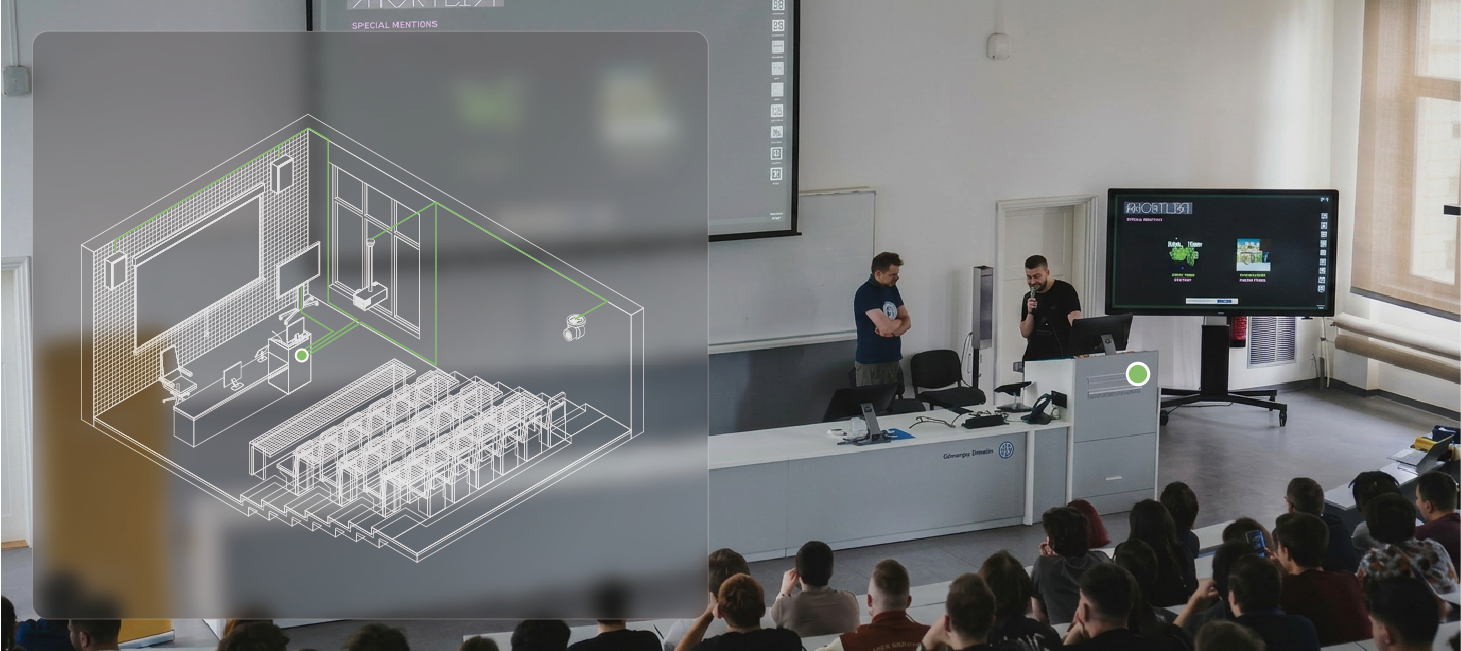
This university hybrid training room was designed to support a wide range of academic activities, from lectures and research demonstrations to hybrid learning and professional meetings.
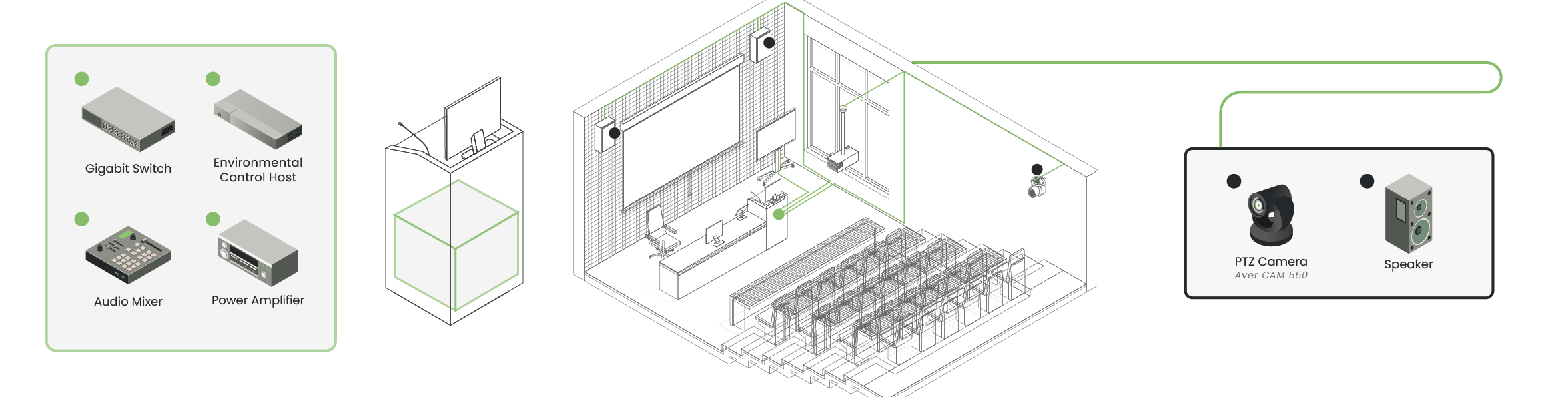
Built around a switch-centric AVoIP architecture, the system centralizes core equipment at the lectern while extending video, USB, audio, and control to distributed room endpoints.
The result is a flexible and manageable environment that supports smooth transitions between in-room presentation, remote participation, and BYOM workflows.
System Configuration
Core System Devices
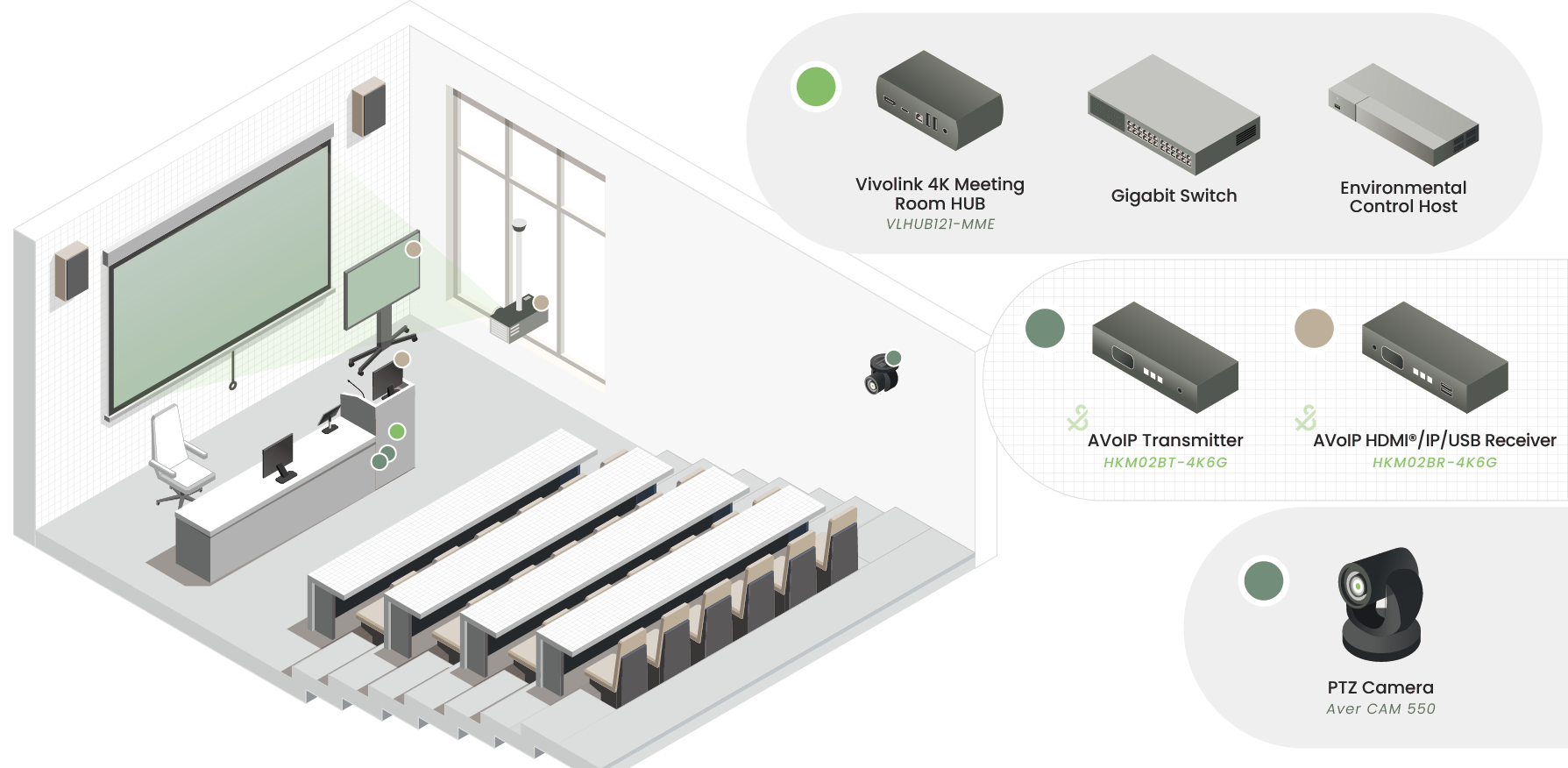
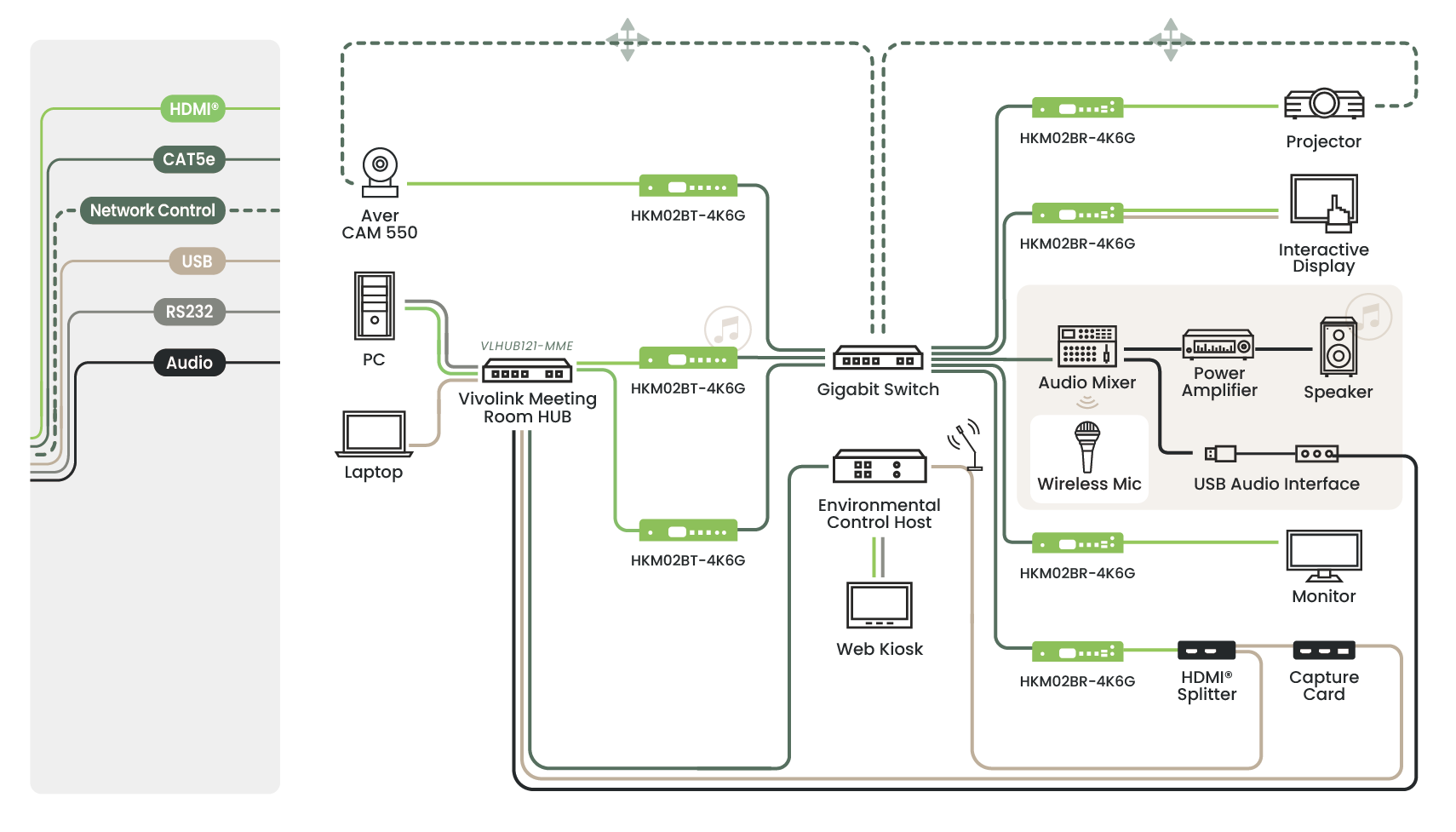
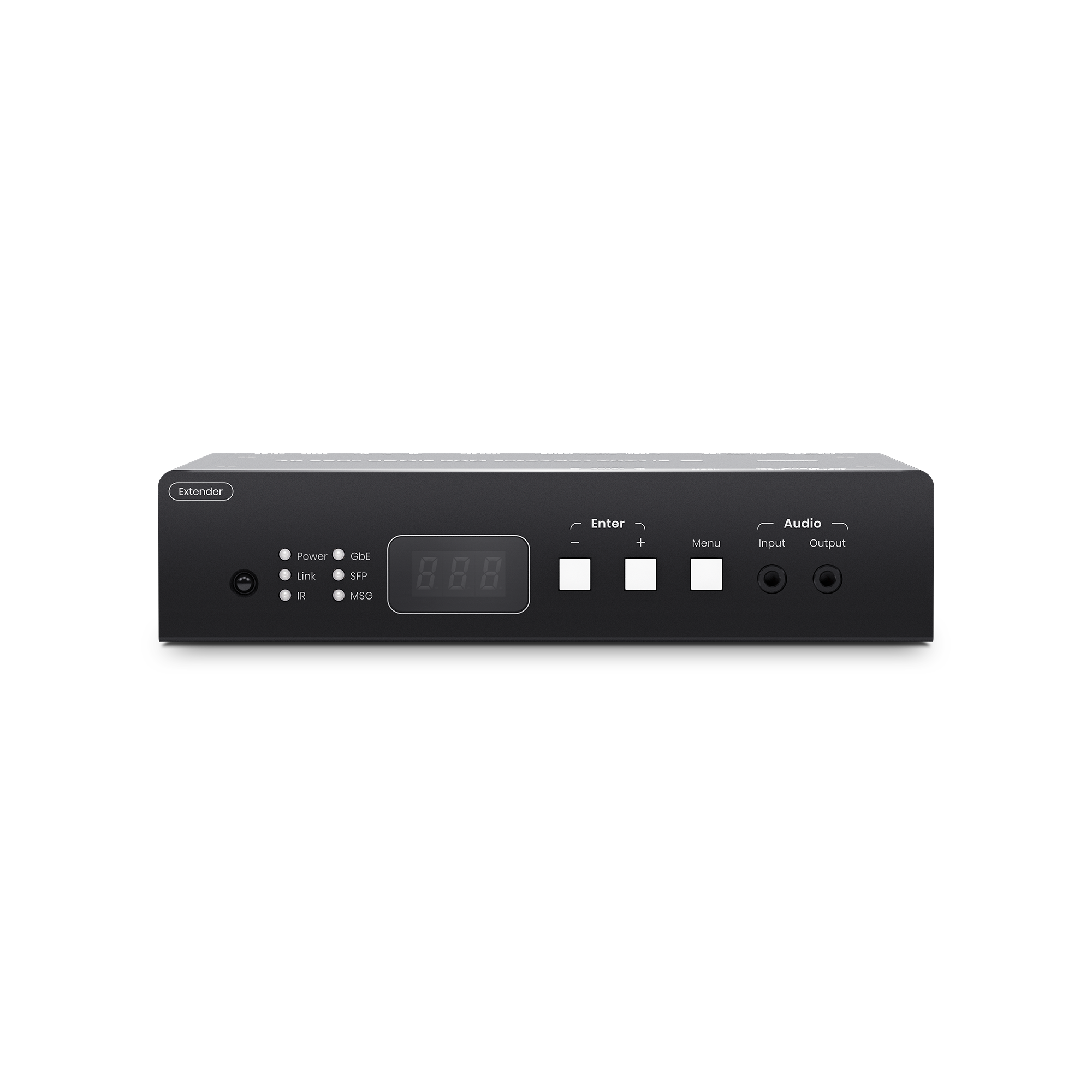
At the heart of this training room is a switch-centered AVoIP architecture that handles signal encoding, decoding, routing, and matrix distribution for both AV and USB data. The entire design is built around KVM switching logic and serves as the primary control target of the room control system.
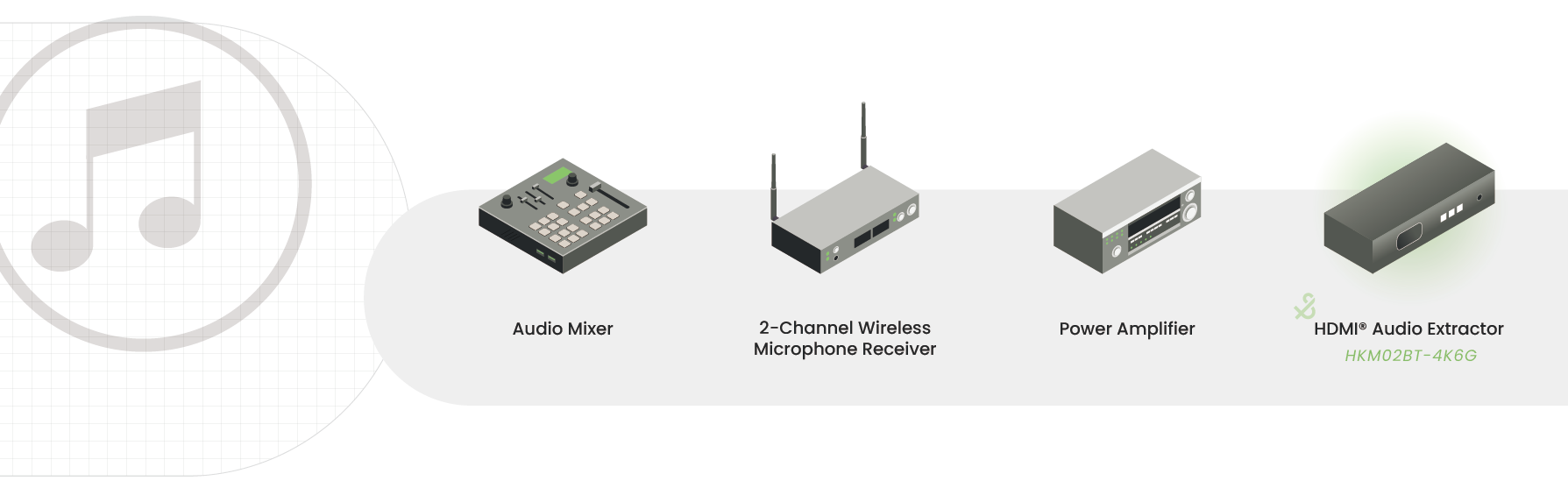
A digital mixer manages all audio input sources and processing.
2-Channel Wireless Microphone Receiver (MIPRO mic 2ch receiver)
Captures the instructor’s voice for both local reinforcement and remote conferencing.
Power Amplifier
Drives the room loudspeakers.
HDMI Audio Extractor
Extracts embedded audio from HDMI sources into the audio system.
Control and Conversion Peripherals
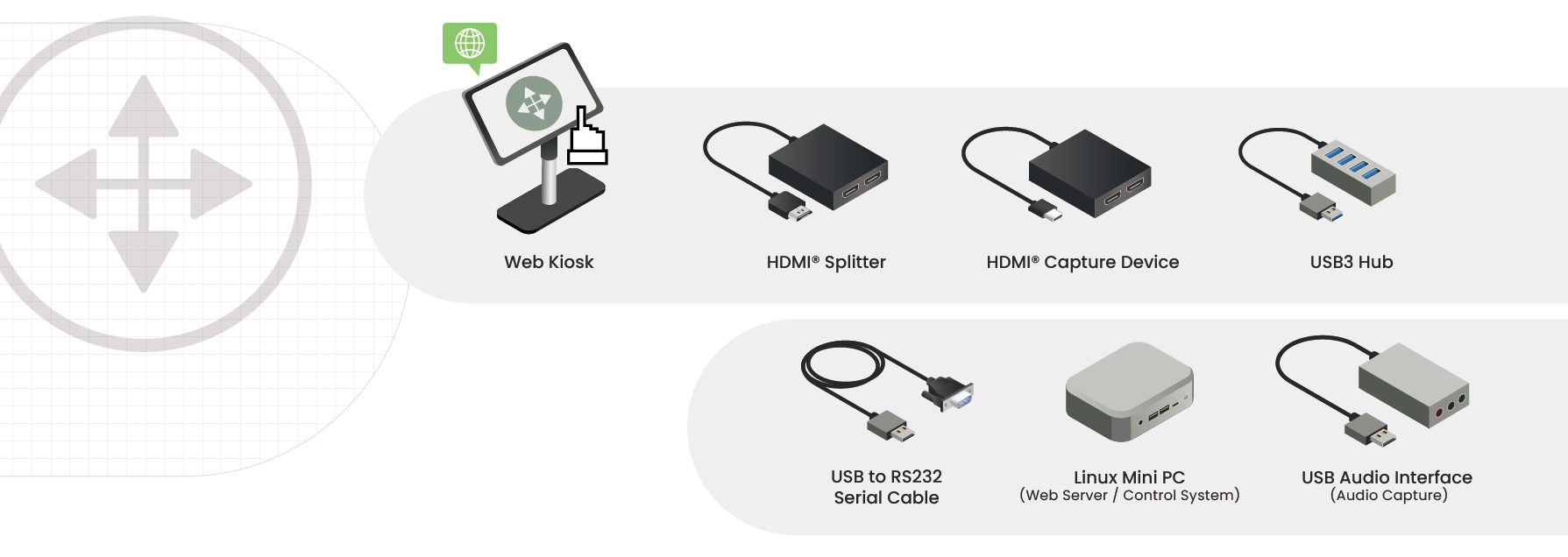
Web Kiosk
Provides a user-friendly interface for source switching, volume adjustment, and PTZ camera (Aver CAM 550) control.
HDMI Splitter
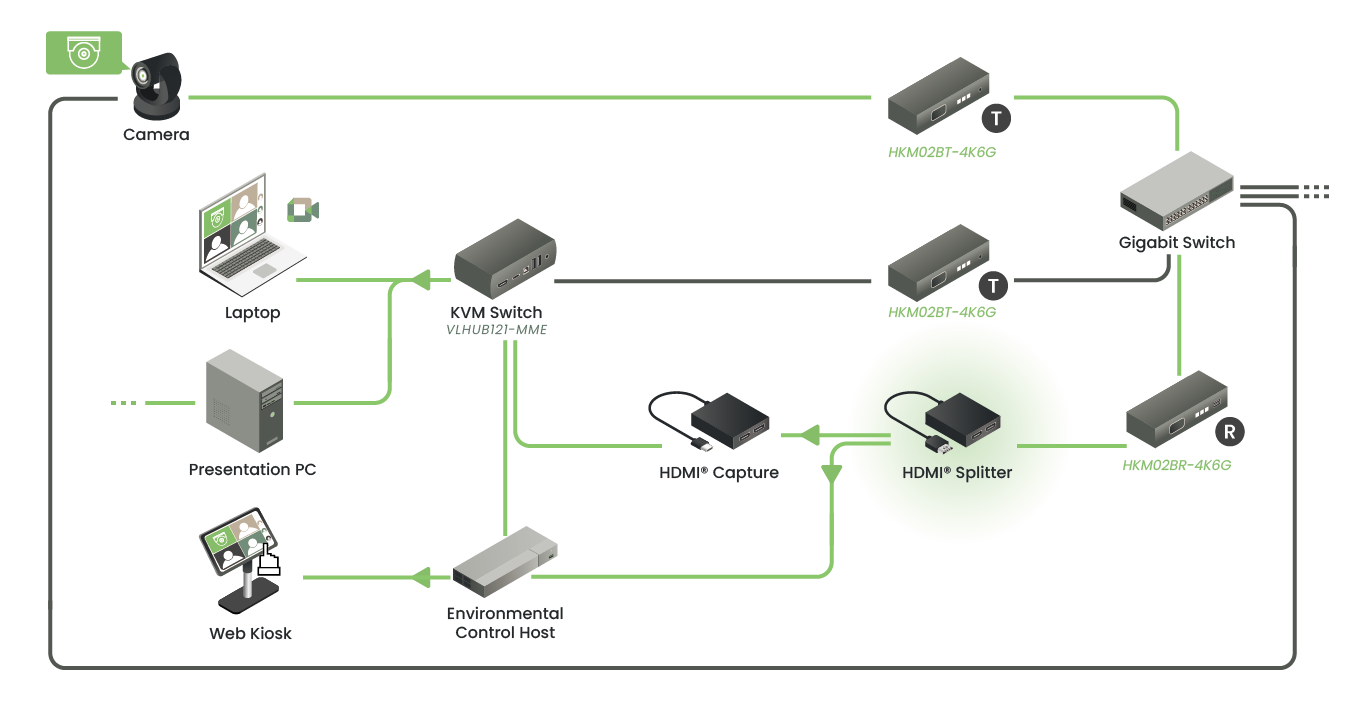
Distributes one HDMI source to multiple downstream devices.
HDMI Capture Device
Converts camera video into USB format for BYOM applications.
USB 3 Hub
Expands USB connectivity for multiple peripherals.
USB-to-RS232 Converter Cable
Enables serial control of legacy devices through the room control system.
Linux Mini PC (Web Server/Control System)
Serves as the environmental control system server and supports smartphone and tablet-based control.
USB Audio Interface (Audio Capture)
Converts the mixed microphone audio into USB audio for the control PC and BYOM laptop workflows.
Power and Management
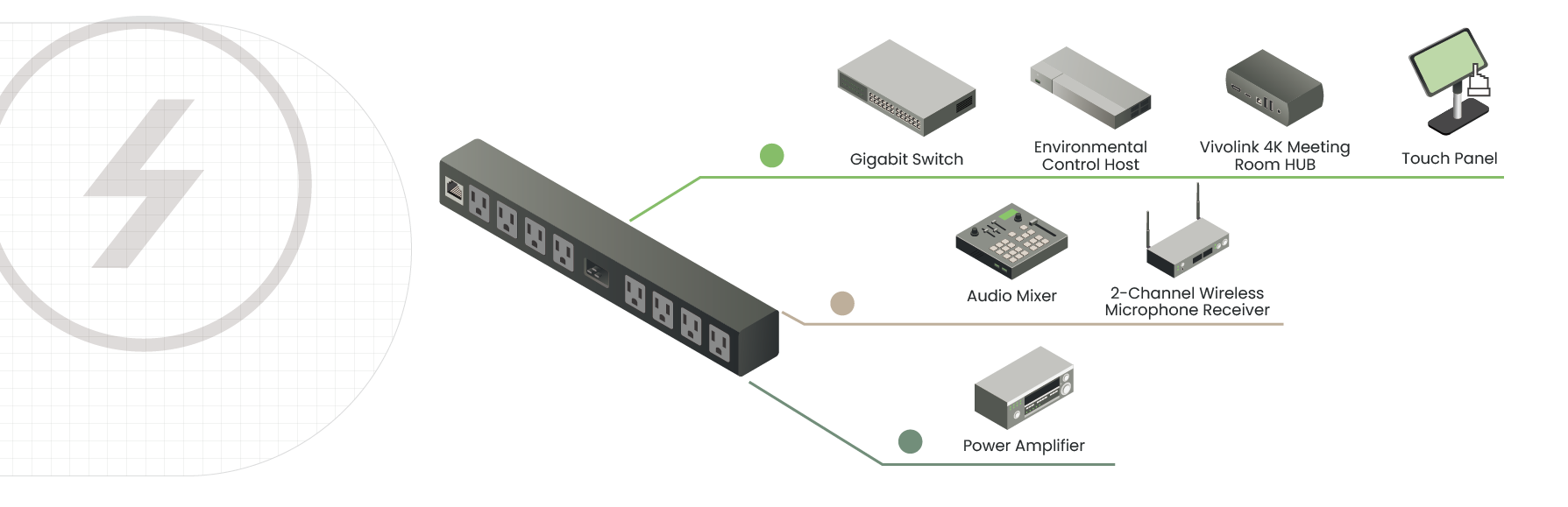
NETIO (Intelligent Power Distribution Unit)
Port 1: Supplies power to the switch, control PC, Vivolink Meeting Room Hub, touch panel, and splitter.
Port 2: Supplies power to the Behringer mixer and MIPRO receiver.
Port 3: Supplies power to the power amplifier.
Space Function and Design Purpose
This project creates a multifunctional hybrid environment that combines teaching, scientific research, and remote collaboration. Rather than functioning as a conventional classroom alone, the space is designed as a flexible platform for advanced data analysis, laboratory collaboration, and international academic communication.
Research and Collaboration Integration
As part of a telecommunications engineering training environment, the room integrates multiple control PCs and professional audio equipment (Midas/Behringer XR12). With USB over IP support, researchers and instructors can switch between in-room sources and control connected room devices over the network, enabling seamless routing between teaching content and laboratory data.
Hybrid Teaching and Remote Conferencing
To support international academic exchange and hybrid learning, the system integrates a professional PTZ camera (Aver CAM 550) and wireless microphone system through the Vivolink Meeting Room Hub. This gives the space strong BYOM capabilities, allowing on-site participants to easily launch remote meetings and share high-quality in-room audio and video with remote experts.
Technical Architecture: Balancing Built-In Resources and BYOD in an AVoIP Framework
Lectern-Side Equipment Centralization
Core system hardware, including the network switch, audio mixer, amplifier, and control PC, is centralized in a lectern-side rack for easier management and maintenance. Remote endpoints such as cameras, displays, and audio devices are then connected over the AVoIP network, which allows HDMI, USB, and audio signals to be extended over structured cabling with lower cabling complexity than traditional point-to-point runs.
Instructor-Centered BYOM/BYOD Control
One of the most distinctive features of this system is the level of control given to the instructor’s personal device.
Single-Cable BYOM Integration
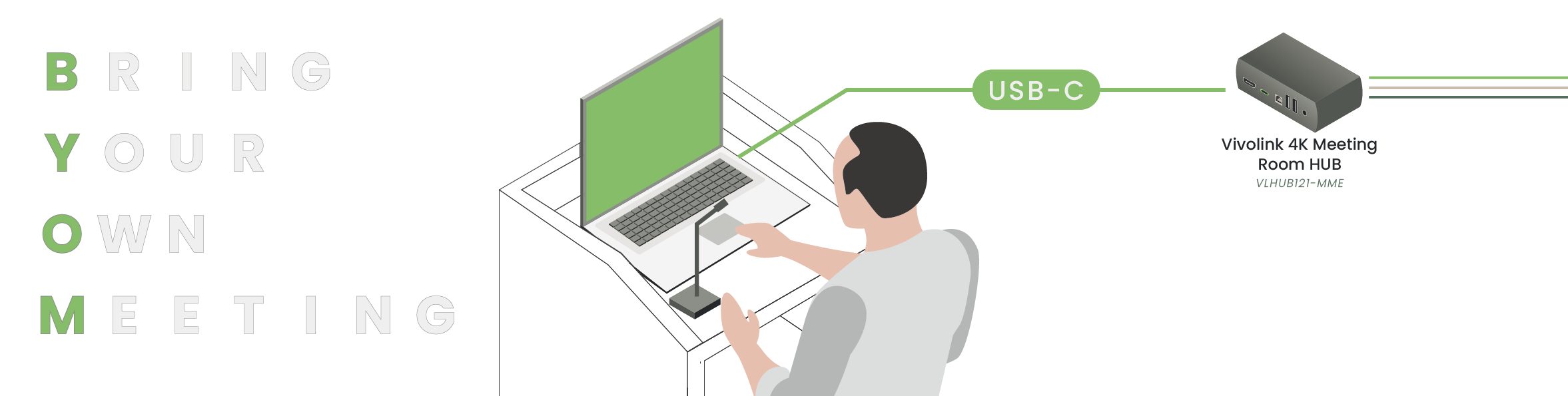
With one USB-C connection, the instructor’s laptop can access the room’s professional AV resources directly.
Remote Camera and Peripheral Access
Through the HDMI/IP/USB transmission system, the instructor can bring the room camera and audio devices into their own conferencing software for BYOM use.
Interactive Touch Display Integration
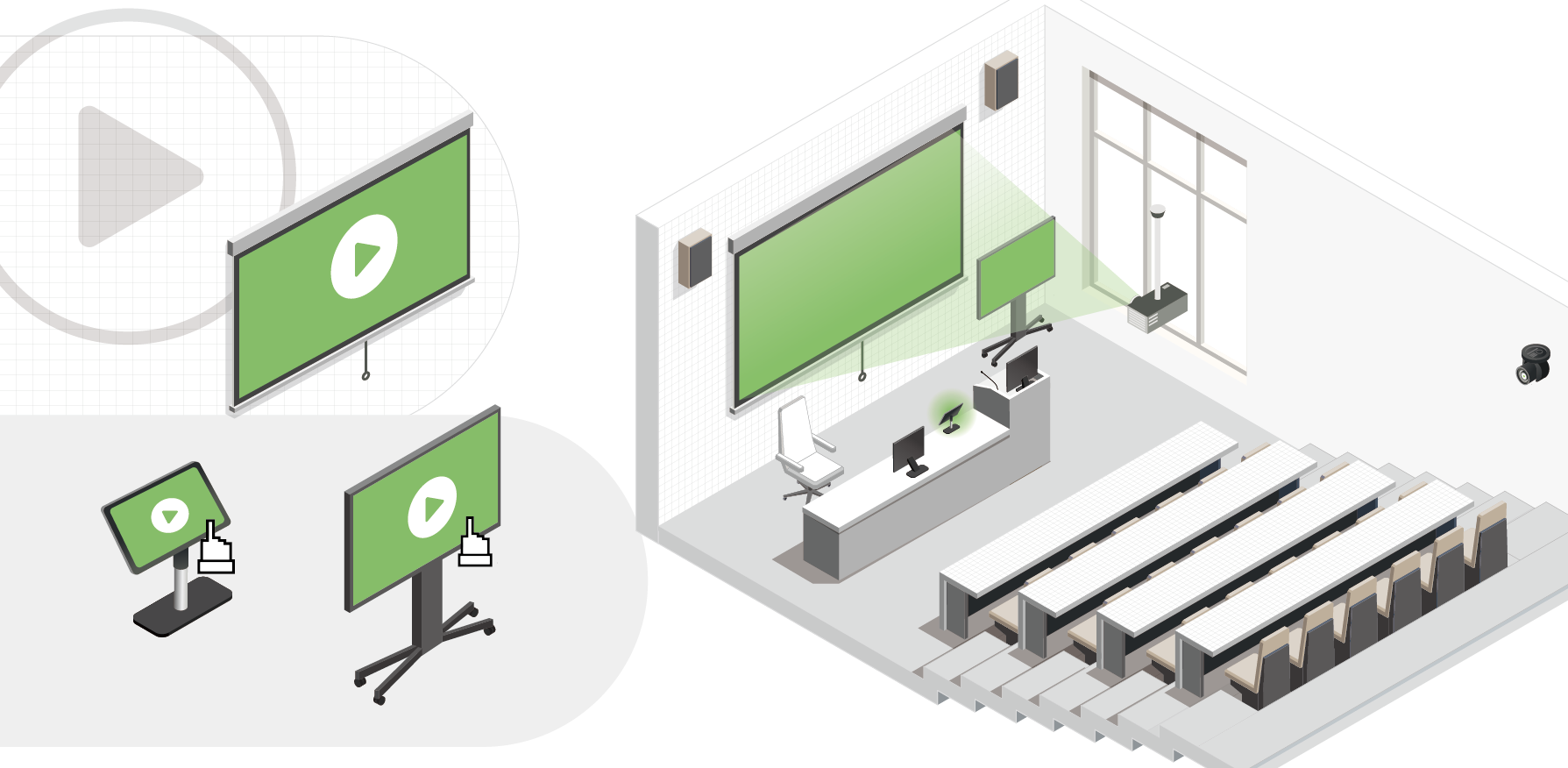
Touch input from the large display is returned over USB over IP to the instructor’s laptop or control PC, enabling responsive and intuitive classroom interaction.
Complete Room Control Through a Touch Control Panel
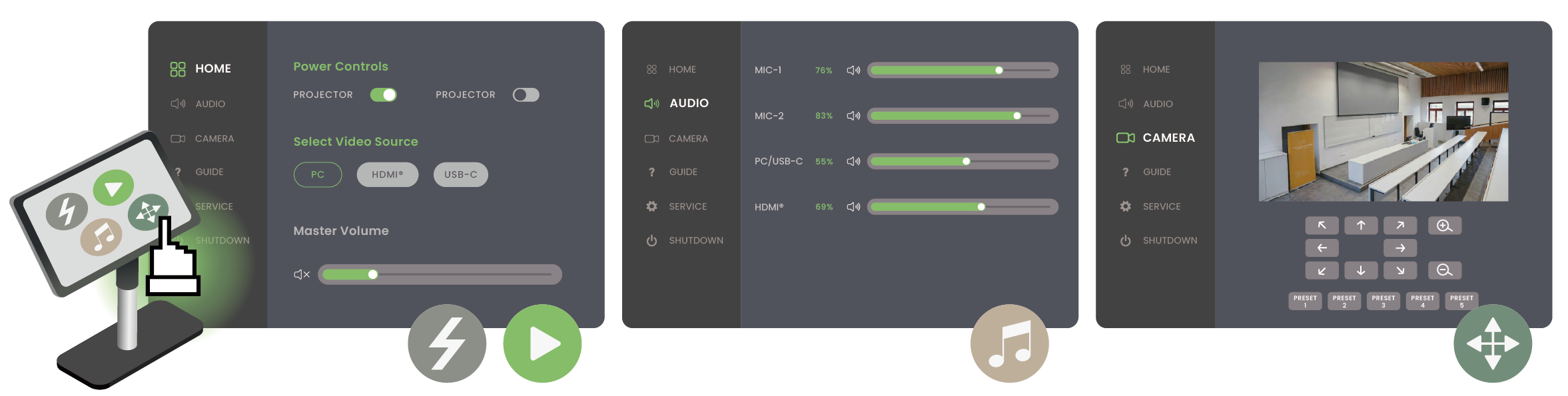
A dedicated touch control panel, independent from the display surface, provides a simplified interface for managing complex AVoIP routing and device coordination.
Key functions include:
Instant AV Routing
Instructors can select sources such as PC, HDMI, or USB-C directly from the panel, and the system automatically routes signals between transmitters and receivers without manual reconnection.
Audio Mixing Control
The interface integrates with the digital mixer, allowing separate adjustment of microphones and AV source levels for optimal local and remote audio balance.
PTZ Camera Control
Instructors can adjust camera pan, tilt, and zoom in real time, with preset recall for fast switching between teaching positions or room views.
One-Touch System Management
Core functions such as projector and camera power control are integrated into the same UI, streamlining room startup and operation.
Flexible AVoIP Switching and Routing
Distributed Encoder and Decoder Deployment
The system uses a 3-input / 4-output AVoIP structure to ensure that each teaching and display area can access the required signal source.
Transmitter Roles
Lectern Input Transmitters (2 units): Encode sources such as the instructor's laptop, document camera, or lectern PC onto the network.
Camera-Side Transmitter (1 unit): Encodes the PTZ camera (Aver CAM 550) feed for network distribution, with the decoded video later converted into USB through a capture device for use by the instructor’s laptop and other room systems.
Receiver Roles
Display-End Receivers (4 units): Deployed at the projector, preview monitor, and additional displays to support mirrored or zone-based content presentation.
AVoIP KVM and Touch Display
When the instructor interacts with the remote touch display, touch coordinates are sent back through the receiver and network to the control PC or instructor device, creating a low-latency interactive teaching experience.
Camera Integration Within the BYOM Workflow
With a single USB-C connection, the instructor’s laptop can enter a BYOM workflow and directly use the room’s camera, audio, and touch resources in conferencing platforms such as Zoom and Teams.
Professional Camera
The camera signal is encoded by a transmitter, routed through the network switch, decoded at the lectern side, and converted to USB via a capture device for conferencing use.
Projector
The instructor’s AV signal is routed over the network to the remote receiver and displayed on the main projection screen.
Touch Display
Touch data is returned through the receiver’s USB port to the instructor’s laptop.
Speakers
Audio is processed by the mixer, amplified, and sent to the room loudspeakers.
Microphones
Wireless microphone audio is mixed, converted into digital USB audio, and then integrated into the Vivolink Meeting Room Hub for use by the instructor’s laptop.
Dual-Path Camera Integration
At the lectern side, the camera feed is divided into two paths: one feeds the control PC for touch panel preview and PTZ adjustment, while the other feeds the KVM switch so the instructor’s laptop can use the camera directly.
Key Applications of the Hybrid Training Room
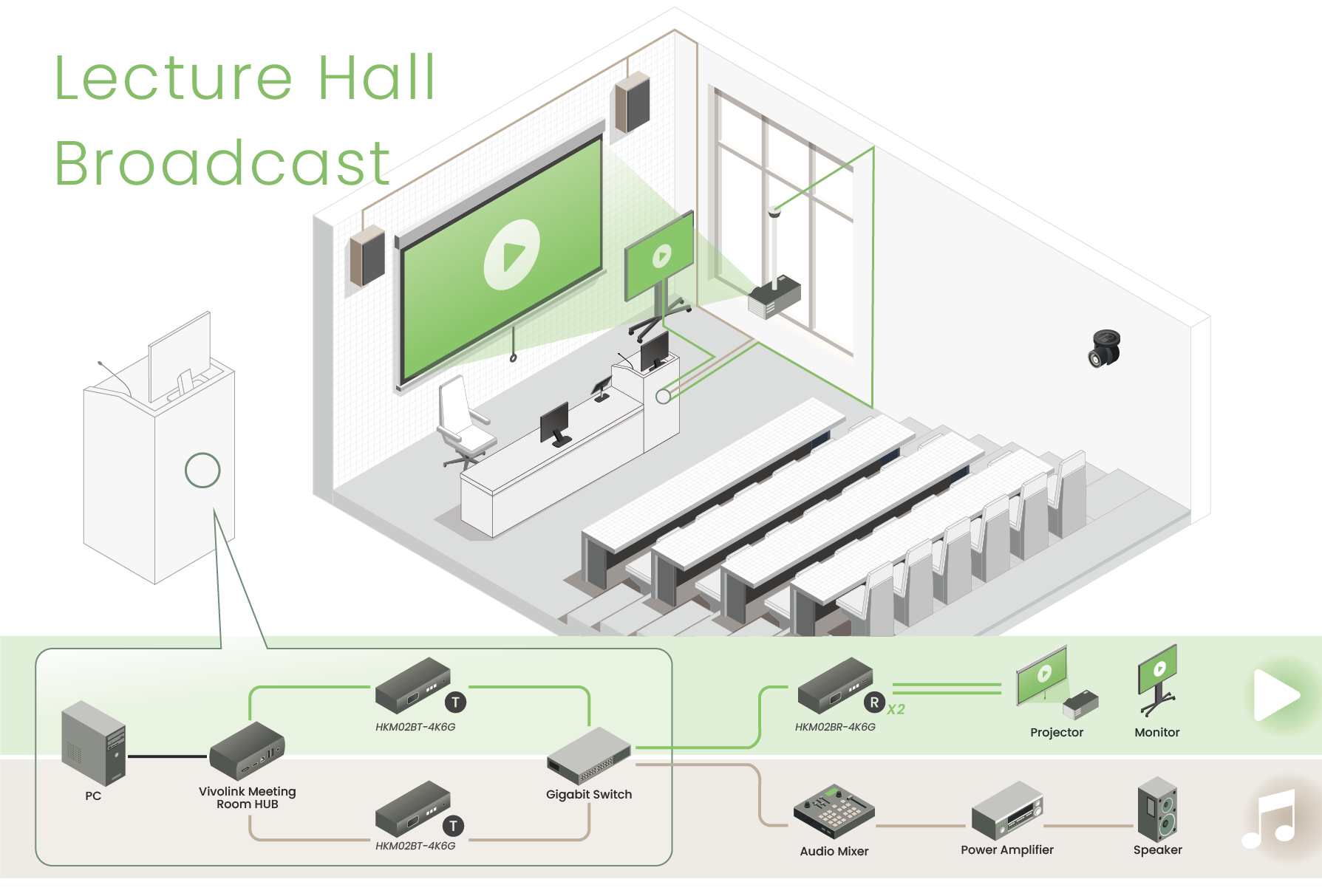
Lecture Hall Broadcast
In lecture mode, the system operates in a broadcast-style workflow, where the lectern PC or instructor BYOD laptop becomes the primary source.
High-resolution video is distributed simultaneously to the main projection screen and preview displays.
Wireless microphone audio is mixed and amplified to ensure clear speech reinforcement throughout the room.
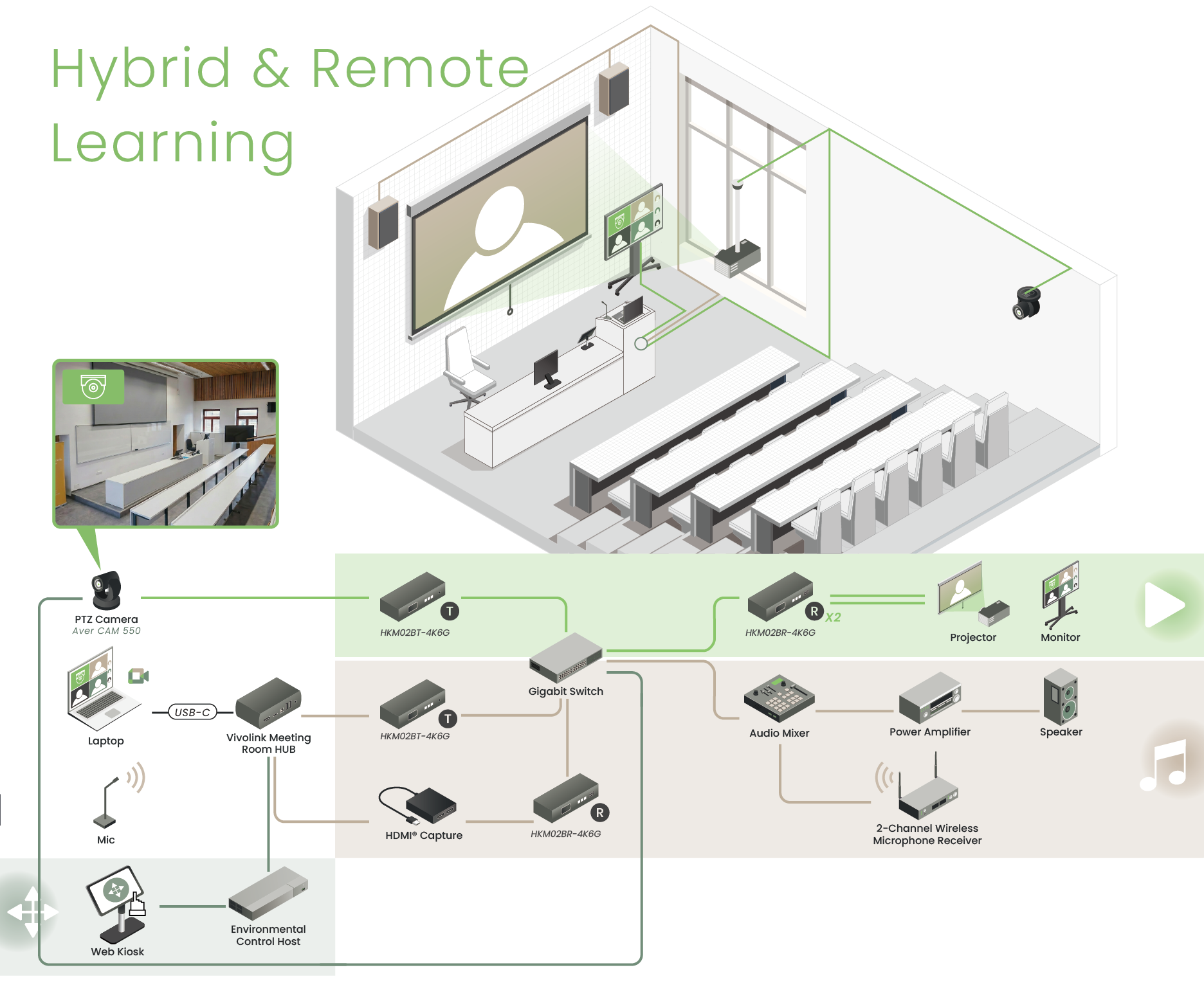
BYOM-Enabled Hybrid and Remote Learning
For remote learning sessions, the instructor connects a laptop through the Vivolink Hub to activate a BYOM workflow, gaining direct access to the room camera and audio system.
Integrated Video
The PTZ camera (Aver CAM 550) feed is delivered back to the instructor’s laptop over the AVoIP network, giving remote participants a clear classroom view.
Two-Way Audio
Remote participants’ audio is played through the room speakers, while local questions and speech are sent back through the wireless microphones and mixer.
Real-Time Camera Adjustment
The instructor can adjust PTZ camera (Aver CAM 550) framing from the touch panel at any time to focus attention on specific equipment, demonstrations, or board content.
Value Delivered for System Integrators
SC&T’s solution goes beyond supplying hardware. It helps system integrators simplify deployment, improve interoperability, and deliver more capable BYOM environments for hybrid learning and remote conferencing.
Simplified System Architecture
Centralized hardware and IP-based signal transport reduce cabling complexity and improve maintainability.
Future-Proof Flexibility
The AVoIP architecture allows for easy expansion by simply adding transmitters or receivers to the network switch without major cabling changes.
Strong Cross-Brand Integration
The solution supports integration with third-party switching, audio, camera, and control devices.
Reliable Product Quality and Technical Support
SC&T provides dependable hardware performance along with practical technical consultation for SI projects.
iSTE is a Slovakia-based AV system integrator with expertise in audiovisual technologies, system integration, and control software. From system design to project delivery, iSTE provides tailored solutions for lecture halls, meeting spaces, and other professional environments, with a focus on practical integration, technical support, and reliable implementation.
Thank you ! Your request has been accepted. We’re looking forward to getting in touch with you. You can expect our response within 3 days. If not, please double check your spam folder.
Oops! Something went wrong while submitting the form.
Thank you ! Your request has been accepted. We’re looking forward to getting in touch with you. You can expect our response within 3 days. If not, please double check your spam folder.
Oops! Something went wrong while submitting the form.
Thank you ! Your request has been accepted. We’re looking forward to getting in touch with you. You can expect our response within 3 days. If not, please double check your spam folder.
Oops! Something went wrong while submitting the form.
Thank you ! Your request has been accepted. We’re looking forward to getting in touch with you. You can expect our response within 3 days. If not, please double check your spam folder.
Oops! Something went wrong while submitting the form.
Cookies Consent
We aim to enhance your experience on our website and would love your help to do so!
By accepting the storage of cookies, you assist us in analyzing website usage and refining our marketing strategies. We use cookies only to enhance your browsing experience and remember your preferences on this site.
You have full control over your cookie settings and can modify them anytime in the Privacy Preference Center. For a comprehensive understanding of how we protect your privacy, please refer to our privacy policy.