4K Camera and Display Upgrades Don't Always Require a Full System Replacement
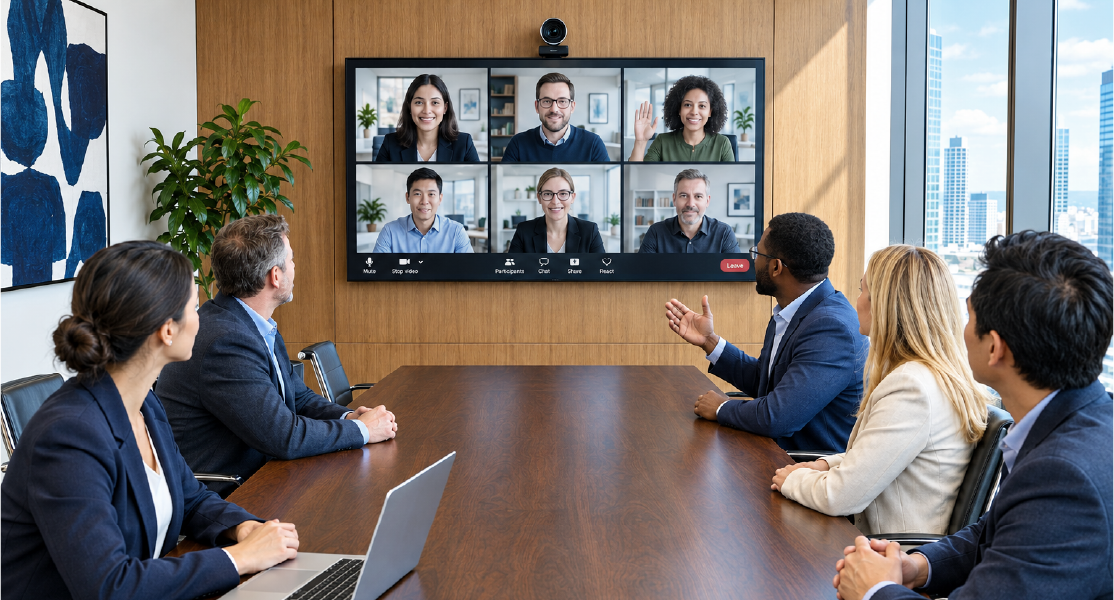
A meeting room may need a 4K camera to capture clearer close-ups of speakers, while a classroom may need a 4K display to present detailed teaching materials. Neither requirement automatically calls for replacing the existing transmission equipment or every 1080p display. The priority is to identify which capabilities need upgrading and whether keeping existing equipment adds signal conversion or maintenance requirements.
AVNation's4K Experiences | AVWeek 781 explores the growing adoption of 4K in professional AV and the importance of user experience beyond resolution. For an existing installation, this means evaluating three areas: the camera capabilities needed for cropped and simultaneous views, the transmission quality and responsiveness the application requires, and the output signals needed to support both 4K and 1080p displays.
4K Camera Cropping, Multiple Views, and Outputs Shape Equipment Requirements
4K Cameras Provide More Flexibility for Cropping
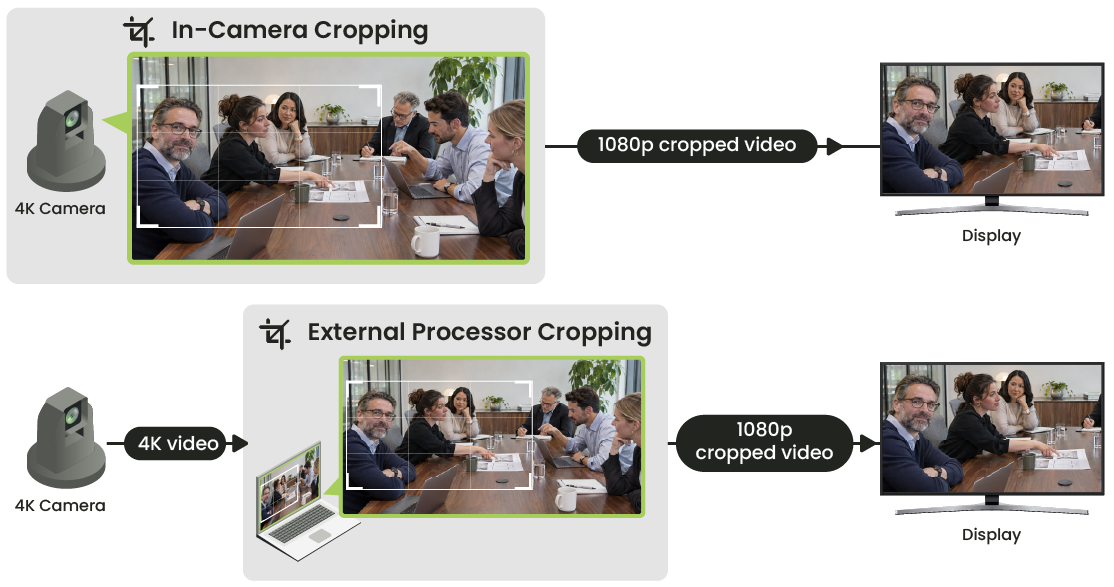
A 4K source provides more pixels to work with when cropping a speaker close-up from a wide meeting-room shot. Even when the final output is 1080p, a 4K source retains more original image detail than a 1080p source at the same cropping ratio. However, tighter cropping still reduces the amount of detail available in the resulting image.
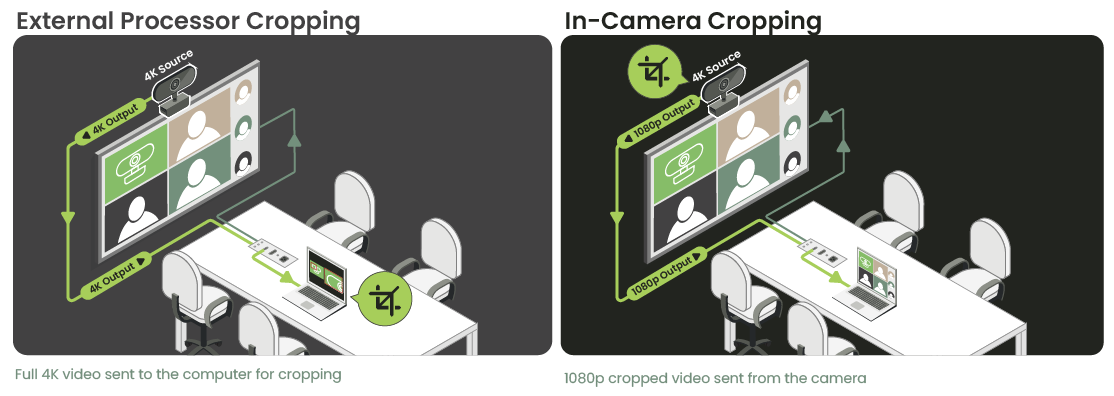
In-Camera Cropping and Simultaneous Outputs Can Reduce External Processing
A meeting room may need to show a wide shot on the local display while remote participants see a close-up of the speaker. This requires more than cropping alone: the system must also deliver both views simultaneously.
If the camera can crop the image and provide both outputs at the same time, an additional cropping processor may not be necessary. Otherwise, a video processor with cropping and multiple-output capabilities can provide the required views.
Switching and Compositing Require Different Capabilities
When a meeting room needs to switch between different camera angles, a video switcher can select the appropriate source. Combining a wide shot and a close-up into a single frame requires compositing capabilities.
Some production switchers handle both switching and compositing, eliminating the need for separate equipment for each task. The key is to identify which functions the existing system can already perform before adding new hardware.
USB and HDMI Outputs on High-End Cameras Shape Downstream Equipment Choices
Some high-end 4K cameras offer both USB and HDMI outputs. The choice between USB and HDMI determines how the camera connects to a conferencing computer, local display, or other AV equipment—and whether additional capture or extension equipment is needed.
USB and HDMI Serve Different Receiving Devices
USB output typically connects a camera to a conferencing computer, allowing meeting software to receive the video feed. HDMI can deliver the camera image directly to a display, video switcher, or AV matrix.
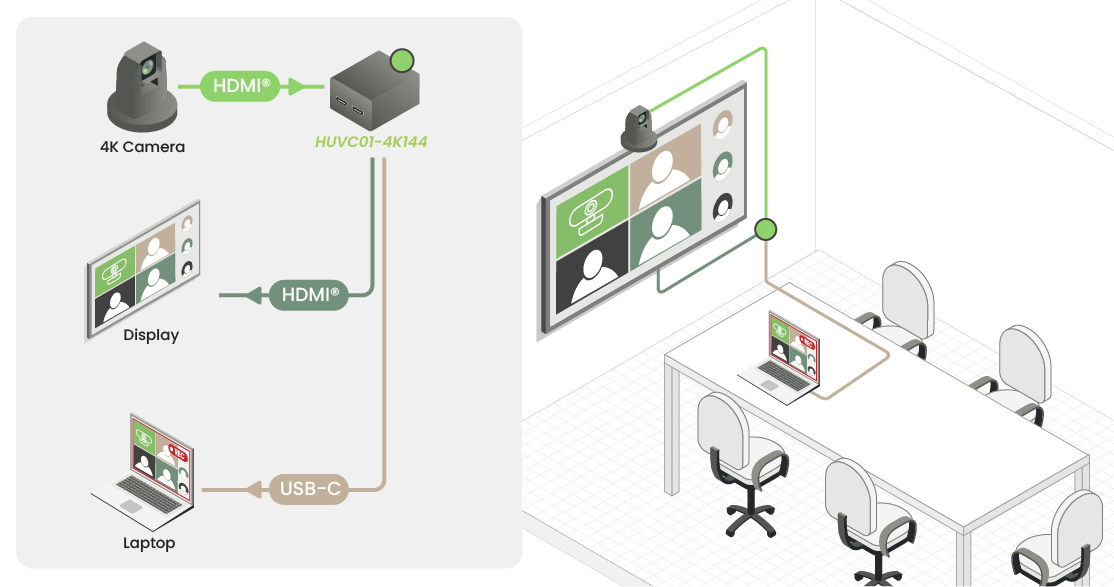
If a camera supports simultaneous USB and HDMI outputs, the same camera source can serve conferencing and local display systems through separate connections. When HDMI is the primary output, a capture device can also make that video available to the conferencing computer.
HDMI Capture with Loopout Supports Conferencing and Local Display
When a camera outputs HDMI but the conferencing computer also needs its video, a capture device converts the HDMI feed into a USB video source that the computer can receive.
SC&T's HUVC01-4K144 sends captured HDMI video to a computer through USB-C and provides an HDMI loop-out connection. The loop-out can deliver the same source image to a local display or compatible AV switching equipment.
The conferencing computer can use the camera for remote meetings while the local AV system receives the HDMI signal through loop-out, without routing the video through the computer.
Extend Camera Signals According to Their Output Interface
Meeting-room and classroom cameras are often mounted high to capture a wider view of the space. When the camera is located far from the conferencing computer, equipment rack, or display, signal extension becomes part of the system design.
A USB camera can connect to a remote computer through a USB extender. An HDMI camera can use an HDMI extender to reach a display, video switcher, or capture device. Choose the extender based on the camera's output interface and destination device, not transmission distance alone.
USB Extenders Must Support the Camera's Transmission Mode and Bandwidth Requirements
When connecting a USB camera to a remote conferencing PC through an extender, transmission distance is only one consideration. The camera's video format, bandwidth requirements, and USB operating mode also affect extender selection.
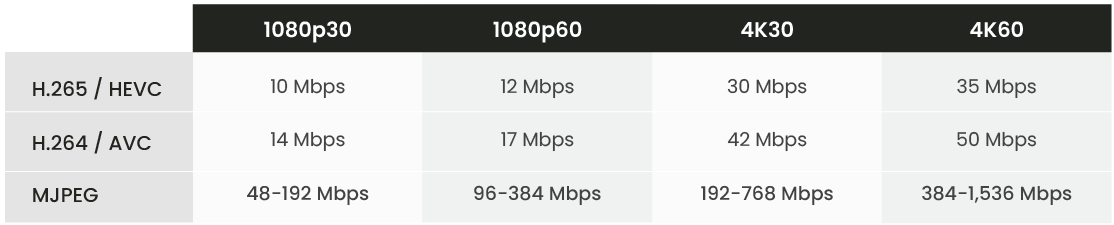
Even at the same resolution, different video formats can require significantly different bandwidth. For example, the chart shows approximately 30 Mbps for H.265 at 4K30, compared with 192–768 Mbps for MJPEG. This difference shows why resolution alone cannot determine which USB extender is suitable.
USB 2.0 has a nominal data rate of 480 Mbps, while USB 3.0 supports 5 Gbps. However, a lower video bitrate does not necessarily mean the camera can output that mode over USB 2.0. For example, SC&T's UE02H supports USB 2.0, while the UE03H supports USB 3.2 Gen 1. If a new camera requires USB 3.0 for its 4K output, an existing USB 2.0 extender cannot support that mode and must be replaced with a compatible extender.
Image cropping also affects the signal that must travel through the system. If the camera outputs an already-cropped close-up, the transmission path carries that selected image. If a downstream processor performs the cropping, the full source image must first reach that processor. Both configurations may ultimately produce a 1080p close-up, but their transmission requirements can differ.
Image Quality and Fine Detail
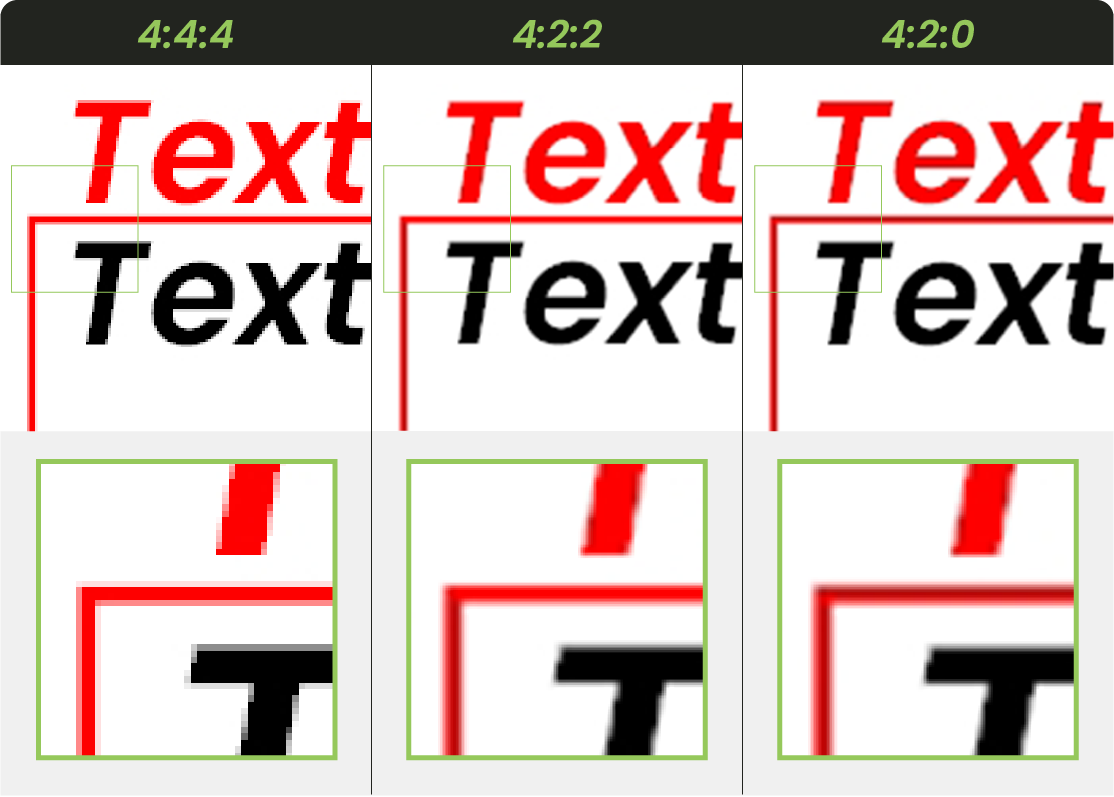
Two systems delivering 4K video may reproduce small colored text and fine lines differently. In an engineering drawing, for example, the clarity of colored annotations can affect how easily viewers identify important details.
All three images were exported from the same source at the same JPEG quality setting, varying only the chroma subsampling format (4:4:4, 4:2:2, or 4:2:0), then cropped to the same area and enlarged at the same magnification.
4:4:4 preserves full chroma sampling, while 4:2:2 and 4:2:0 reduce the amount of color information. This can soften the edges of fine colored details. When displaying detailed drawings, resolution alone is not enough to assess image quality.
Distance and Existing Cabling
Existing cabling can remain in place only if the transmission equipment supports the required video format over the installed distance.
Consider a meeting room with CAT6 cabling. A system that successfully carries 1080p does not necessarily support 4K60 4:4:4 over the same cable run. The extender's supported signal formats must be checked against the existing cable type and distance.
If the installed infrastructure meets the requirements, it can remain. Otherwise, the project may require a different transmission solution, a revised signal format, or new cabling.
Operating Latency
Latency matters more when users control a computer remotely than when they watch one-way video. During remote operation, mouse movements and window dragging require the display to respond promptly.
HDBaseT 3.0 uses uncompressed transmission to maintain low latency. H.265-based transmission involves encoding, decoding, and buffering, which can add delay to the displayed image.
Three Common AV Transmission Approaches
HDBaseT 3.0: Uses uncompressed transmission for applications that prioritize image detail and very low latency.
1G SwiftSync: Uses light compression to balance image quality and low latency within a 1G transmission architecture.
H.265: Uses higher compression to reduce bandwidth requirements and can suit video transmission where immediate interaction is less critical.
In SC&T's tests at 100 meters, the HDBaseT 3.0 and SwiftSync setups responded more like a direct connection. The tested H.265 setup showed more noticeable delay and compression artifacts in detailed and moving images. These findings reflect the equipment and conditions used in that test.
Readable 4K Content Depends on Layout and Viewing Distance
Enlarge Key Content to Make Fine Details Easier to Read
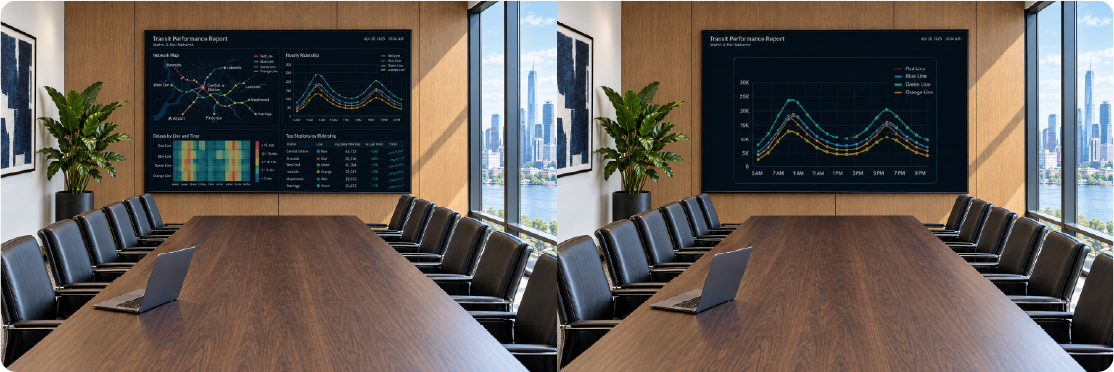
4K displays can show more text and graphical detail, but fitting more content onto one screen does not necessarily make it easier to read.
During remote instruction, for example, several charts may need to appear on the display at once. If the discussion focuses on one chart, enlarging that area can make its details easier to identify than keeping every chart visible at the same size. The layout should follow what the audience needs to examine, rather than simply taking advantage of the available resolution.
Viewing Distance Affects Text and Chart Readability
Viewing distance also influences how well an audience can read displayed information. In a large classroom or meeting room, people seated farther from the screen may still struggle to read small numbers and text, even on a 4K display.
Content size, display dimensions, and viewing distance should therefore be planned together. Higher resolution improves the viewing experience only when the audience can actually see the relevant details.
Keeping 1080p Displays with 4K and Higher-Resolution Sources Requires Compatible Output Signals
Verify the Output Resolution Required by Each Display
Existing 1080p displays do not always need to be replaced when higher-resolution sources are introduced. The first requirement is to ensure that older and newer displays can each receive an appropriate signal.
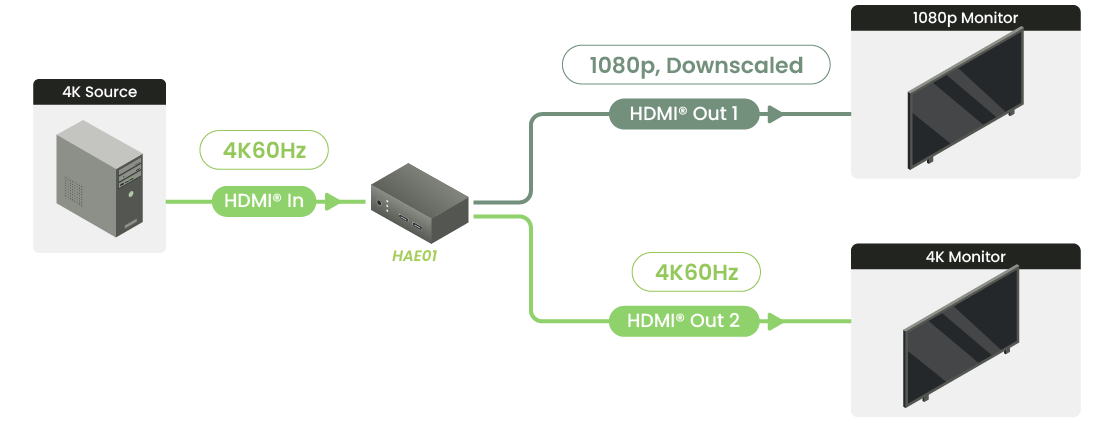
For example, sending one 4K source to both a 4K display and a 1080p display requires different output resolutions. EDID helps identify the formats supported by each display, but the system also needs the ability to provide the necessary resolution conversion.
EDID tells a video source which signal formats a display supports. It does not convert a 4K signal into 1080p.
If the system can provide only a common 1080p output to both displays, the 4K screen will also receive a 1080p image. Equipment capable of providing different output resolutions and scaling the signal allows each display to receive an appropriate format.
SC&T's HAE01 supports resolution upscaling and downscaling and features two HDMI outputs. With a 4K source, it can provide a 4K signal to a newer display and a 1080p signal to an existing screen. This keeps the older display in service without giving up the newer screen's 4K capability.
Resolution scaling changes the output format; it does not restore image detail that was absent from the original source.
Deciding What to Keep: Function, Cabling, Complexity, and Serviceability
Keeping existing 1080p equipment can reduce replacement needs. However, adding scalers, switchers, or distribution devices to support it can also introduce more connections, configuration work, and potential failure points. A targeted upgrade is not necessarily simpler than a full system replacement.
Before deciding what to keep or replace, consider four factors:
Function: What does the upgrade need to deliver—speaker close-ups, multiple views, fine image detail, or responsive control? Which of these can the existing system already support?
Cabling: Can the installed cables and extenders carry the required signal formats over the existing distances?
Additional signal stages: What extra scaling, switching, or distribution equipment would be needed to retain the existing devices?
Serviceability: How would the added equipment affect troubleshooting and maintenance, and who would be responsible for configuration and support?
Retaining existing equipment makes sense when it meets the new requirements over the installed infrastructure without adding excessive complexity. If keeping older devices requires multiple conversion and switching stages, replacing those components may be easier to integrate and maintain.
Define what the upgraded system needs to do before deciding which equipment to keep or replace.
Thank you ! Your request has been accepted. We’re looking forward to getting in touch with you. You can expect our response within 3 days. If not, please double check your spam folder.
Oops! Something went wrong while submitting the form.
Thank you ! Your request has been accepted. We’re looking forward to getting in touch with you. You can expect our response within 3 days. If not, please double check your spam folder.
Oops! Something went wrong while submitting the form.
Thank you ! Your request has been accepted. We’re looking forward to getting in touch with you. You can expect our response within 3 days. If not, please double check your spam folder.
Oops! Something went wrong while submitting the form.
Thank you ! Your request has been accepted. We’re looking forward to getting in touch with you. You can expect our response within 3 days. If not, please double check your spam folder.
Oops! Something went wrong while submitting the form.
Cookies Consent
We aim to enhance your experience on our website and would love your help to do so!
By accepting the storage of cookies, you assist us in analyzing website usage and refining our marketing strategies. We use cookies only to enhance your browsing experience and remember your preferences on this site.
You have full control over your cookie settings and can modify them anytime in the Privacy Preference Center. For a comprehensive understanding of how we protect your privacy, please refer to our privacy policy.