Beyond 4K Output: How Resolution Shapes Professional AV Workflows
A camera and a laptop may both use 4K, but they do not necessarily send the same signal downstream. A camera with digital reframing capabilities can crop its 4K source to produce close-up shots and output the processed image. When a laptop shares spreadsheets at 4K, the AV equipment along the signal path must support the laptop's 4K output if the display needs to retain the original text and data detail.
Drawing on AVNation's 4K Experiences | AVWeek 781, this article explores how resolution affects camera framing, content presentation, and video transmission.
4K Cropping Depends on the Detail Required in the Close-Up
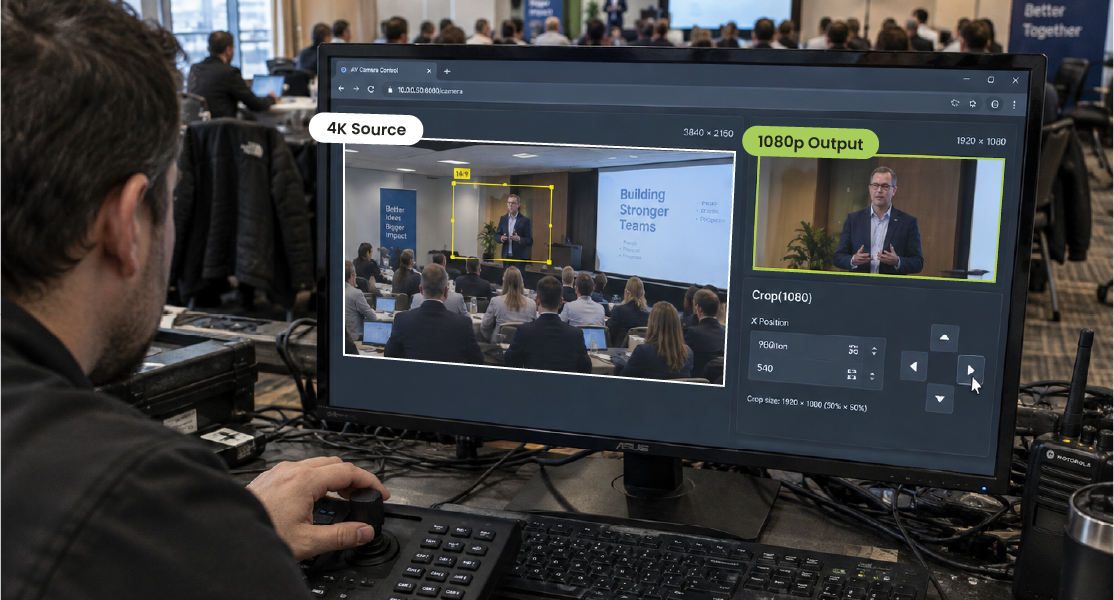
A 4K camera with digital cropping capabilities can generate wide views and close-ups from the same source image. The additional pixels provide room for reframing, but the detail available in a cropped image depends on how much of the source is retained and what the final output requires.
Consider a customer who wants a close-up of a meeting participant cropped from a 4K wide shot, while preserving native 4K detail. The crop contains fewer original pixels than the full source image. Scaling it back to 4K output cannot recover the detail excluded by cropping.
If the close-up only needs to be 1080p, the same 4K source provides more room for cropping, provided enough original pixels remain to preserve the required detail. Integrators therefore need to understand the intended framing and output quality of each shot, rather than relying on the camera's source resolution alone.
More On-Screen Information Still Needs to Be Readable
Higher resolution can preserve more text and data detail on screen, making it possible to keep multiple documents visible for comparison. However, the amount of information displayed and how easily viewers can read it are separate considerations, particularly in shared meeting spaces.
During a budget review, for example, a laptop and display that support 4K can show two spreadsheets side by side when the content layout is suitable. Participants can compare the overall figures before the discussion moves to a specific expense. The presenter can then enlarge the relevant cells on the laptop so the audience can examine those numbers more easily.
The same display system supports both stages, but the content layout changes with the discussion. Side-by-side viewing helps compare information, while examining specific figures requires attention to text size, display size, and viewing distance.
Higher resolution makes it possible to retain more information on screen. It does not mean every detail needs to remain visible at once.
Camera close-ups and 4K content sharing may both involve AV extension, switching, or distribution equipment. The signals these devices need to carry depend on whether the source has already processed the image or whether downstream equipment still requires the full-resolution video.
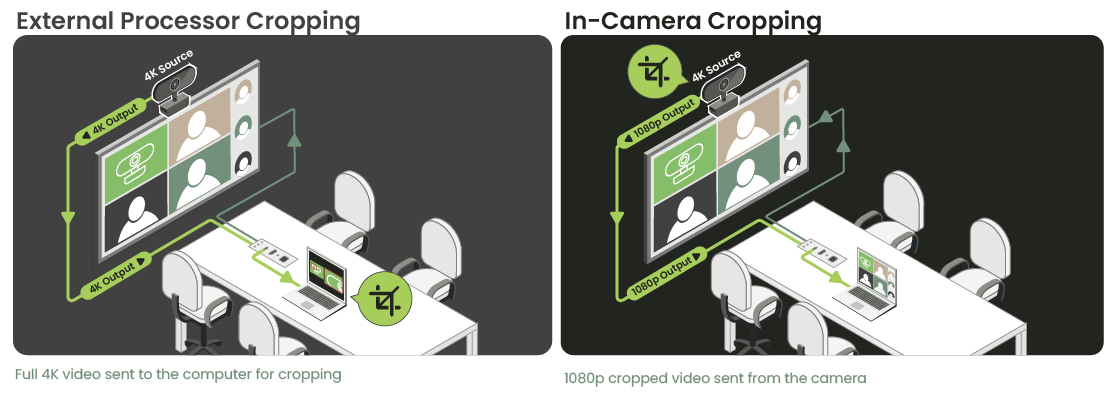
When a camera handles cropping and reframing internally, downstream equipment receives the processed output. Alternatively, an external processor may generate the close-up. If it requires the full 4K source, the camera must support that output resolution, and the connection to the processor must carry the corresponding signal.
Consider a system delivering a 1080p close-up. One approach crops the camera's internal 4K source and outputs 1080p. Where the equipment supports it, the camera can send its full 4K output to an external processor, which creates the 1080p close-up. Both deliver the same output resolution, but their upstream transmission requirements may differ.
Content sharing creates a different requirement. If a laptop's 4K output passes through AV extension, switching, or distribution equipment, those devices must support the required 4K signal when the original text and data detail needs to be preserved at the display.
Check the Signal Specifications Behind 4K Support
Identifying which connections need 4K is only part of the design. Equipment labeled 4K-capable may support different frame rates, color formats, and transmission distances.
Source output: Start with the camera's or laptop's actual output interface, resolution, and frame rate.
Image processing: Establish whether the camera generates the close-up internally or an external processor handles it. This determines which connections carry the full 4K source and which carry processed video.
Transmission equipment: Extenders, matrix switchers, and AV over IP systems must support the required resolution and frame rate. Support for 4K30 does not guarantee 4K60.
Image detail: Chroma subsampling and video compression can affect how colored text, fine lines, and interface edges appear. For example, 4:4:4 retains full chroma resolution, while 4:2:0 reduces chroma resolution. Even at the same 4K resolution, this may affect the appearance of colored text and fine lines.
Receiving equipment: The external processor must be able to accept the camera's actual output. For displays, verify that the selected input and its settings support the intended 4K signal.
Cable specifications and transmission distance must suit the required signal. If the system carries protected content, HDCP compatibility must also be verified.
Define the 4K Requirements for Each Signal Path
A 4K-capable AV system does not necessarily need every connection to carry a full 4K signal. A camera may process the image and output lower-resolution video. Other connections may need to carry the full 4K signal to an external processor or display.
System planning should establish the signal requirements for each connection and verify that the equipment can support them, rather than relying on a 4K label alone.
Thank you ! Your request has been accepted. We’re looking forward to getting in touch with you. You can expect our response within 3 days. If not, please double check your spam folder.
Oops! Something went wrong while submitting the form.
Thank you ! Your request has been accepted. We’re looking forward to getting in touch with you. You can expect our response within 3 days. If not, please double check your spam folder.
Oops! Something went wrong while submitting the form.
Thank you ! Your request has been accepted. We’re looking forward to getting in touch with you. You can expect our response within 3 days. If not, please double check your spam folder.
Oops! Something went wrong while submitting the form.
Thank you ! Your request has been accepted. We’re looking forward to getting in touch with you. You can expect our response within 3 days. If not, please double check your spam folder.
Oops! Something went wrong while submitting the form.
Cookies Consent
We aim to enhance your experience on our website and would love your help to do so!
By accepting the storage of cookies, you assist us in analyzing website usage and refining our marketing strategies. We use cookies only to enhance your browsing experience and remember your preferences on this site.
You have full control over your cookie settings and can modify them anytime in the Privacy Preference Center. For a comprehensive understanding of how we protect your privacy, please refer to our privacy policy.